What Is a Virtual Mailbox?
As we shift toward a more connected world, virtual mailboxes are becoming an increasingly practical solution for managing physical mail. Yet, the concept is still unfamiliar to many people. So, what exactly is a virtual mailbox?
A virtual mailbox combines traditional mail services with modern digital technology. It provides you with a physical mailing address where your postal mail and packages are received on your behalf. Your mail is then digitized, allowing you to view and manage it online from virtually anywhere.
Virtual mailboxes are particularly useful for frequent travelers, expats, remote professionals, and businesses that need a reliable mailing address without being tied to a specific physical location.
The journey of virtual mailbox services reflects the broader evolution of communication in the digital age. What began primarily as a solution for travelers and global nomads has expanded to serve individuals, remote professionals, and businesses looking for greater control and flexibility over their mail.
How Does a Virtual Mailbox Work?
A virtual mailbox connects the physical and digital sides of mail management. When mail arrives at your assigned mailing address, it is received and processed by the provider. The mail is then digitized so you can view and manage it through a secure online interface.
Depending on the service, you may also be able to request actions such as mail forwarding, scanning, shredding, or physical storage.
This process modernizes traditional mail management, giving users greater flexibility while maintaining access to their physical correspondence.
Core Components of a Virtual Mailbox
Digital Mailbox Interface
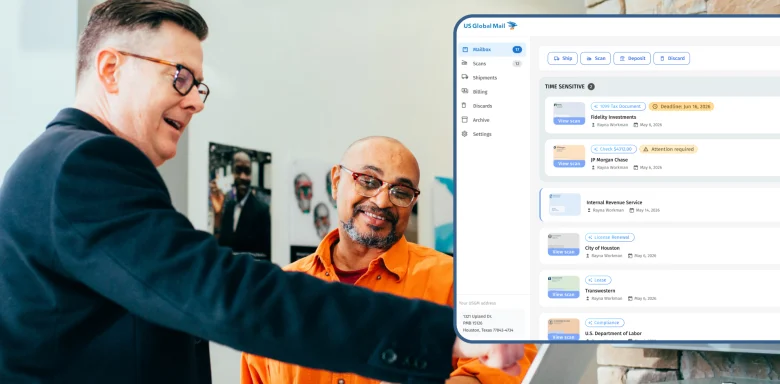
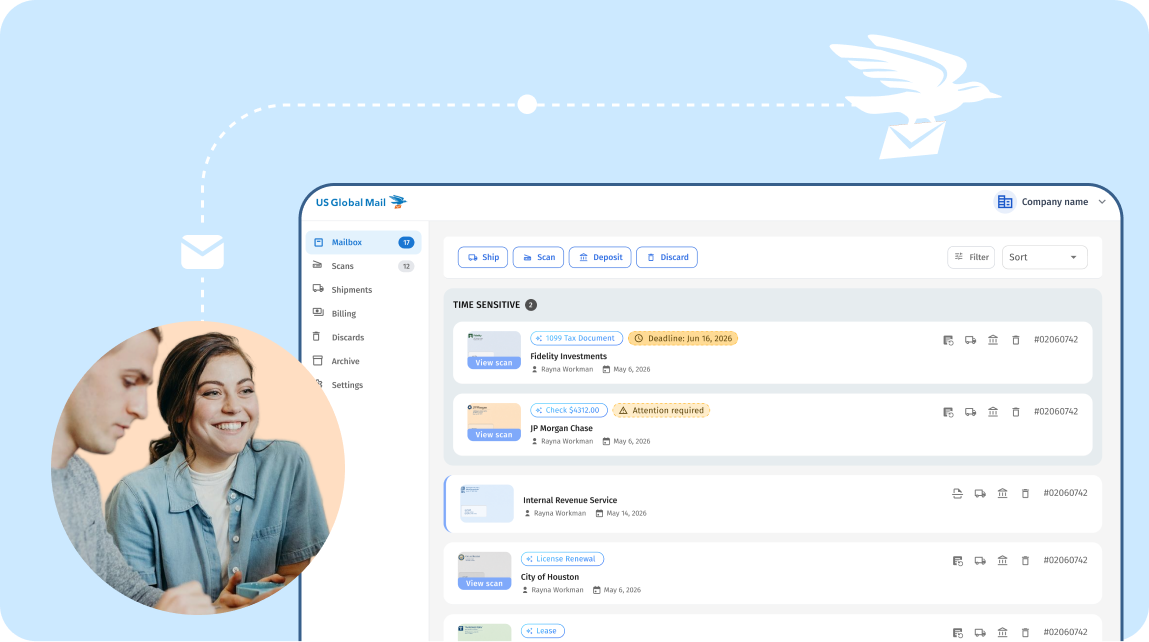
The digital mailbox interface is the central part of a virtual mailbox service. Through the online platform, users can view scanned images of envelopes, mail, and packages and manage how their items are handled.
Depending on the provider, users may be able to request actions such as opening, scanning, forwarding, or storing mail. The digital interface provides a convenient connection between physical mail and online access, regardless of where the user is located.
Physical Mail Handling
Virtual mailboxes still rely on physical mail handling behind the scenes. Mail is received, sorted, and processed at a designated facility before being made available through the user’s digital mailbox.
Trained staff handle incoming mail and ensure items are properly processed and cataloged. This physical process is an essential part of maintaining accurate and secure digital mail records.
Mail Forwarding Services
Mail forwarding adds another layer of flexibility to virtual mailbox services. Users can request that physical mail and packages be forwarded to another address, including locations around the world.
This can be especially useful for people who travel frequently, relocate, or live outside their home country while still needing access to their physical mail.
Virtual Mailbox Security Features
Security is an important consideration when choosing a virtual mailbox service. Providers use measures such as secure login protocols, digital security controls, and physical security at mail-handling facilities to help protect customer mail.
These safeguards are designed to protect sensitive information throughout both the physical handling and digital management of mail.
How to Set Up and Use a Virtual Mailbox
Getting started with a virtual mailbox typically involves choosing a provider, creating an account, completing any required identification or compliance steps, and selecting a plan that fits your needs.
Once your account is set up, you receive a physical mailing address where your postal mail can be received and processed.
Registration and Setup
The process begins by selecting a virtual mailbox provider and creating an account. You then choose a plan based on your expected mail volume and service needs and provide any identification required to comply with applicable postal regulations.
Once the setup is complete, you receive a physical mailing address. This address serves as the destination for your incoming postal mail and packages.
Receiving Mail Digitally
Mail Scanning and Uploading
When mail arrives at the physical mailbox location, it can be scanned and uploaded to your digital mailbox. This allows you to view your incoming mail online without having to be physically present at the mailing address.
Instead of sorting through a physical mailbox, you can review your mail through an online interface and decide what should happen to each item.
Mail Notifications
Virtual mailbox services can also notify users when new mail arrives or when a requested mail-handling action has been completed.
Notifications help users stay informed about incoming correspondence and take action when necessary.
Managing Physical Mail
Mail Forwarding
Users can request that physical mail or packages be forwarded to another address. This provides flexibility for people who move frequently, travel, or live abroad.
Whether you need an important document sent to you or want to consolidate several mail items into one shipment, forwarding allows you to manage physical mail without being tied to your virtual mailbox address.
Package Management
Virtual mailbox services can also help manage incoming packages. Depending on the provider, users may have options to forward, hold, or return packages after receiving a notification.
This extends the convenience of a virtual mailbox beyond letters and documents to include physical deliveries.
Benefits of Using a Virtual Mailbox
Virtual mailboxes offer several benefits for people and businesses looking for a more flexible way to manage physical mail.
Convenience for Remote Professionals and Travelers
Virtual mailboxes are particularly useful for remote professionals, businesses, frequent travelers, and people who do not maintain a single permanent location.
With online access to incoming mail, users can stay informed and manage their correspondence from virtually anywhere. This provides greater flexibility without requiring a traditional physical mailbox.
Privacy and Security
A virtual mailbox can help keep a personal or business address private. Instead of using a home address for business correspondence or other mail-related purposes, users can use a dedicated mailing address.
Digital access can also reduce the need to physically store and organize large amounts of mail, while secure handling processes help protect sensitive correspondence.
Simplified Mail Management
Virtual mailboxes make it easier to organize and manage incoming mail digitally. Users can review, archive, and manage their mail through an online interface instead of manually sorting through physical mail.
For businesses, this can help reduce the administrative work associated with receiving and organizing physical correspondence while making important mail easier to access.
Why Virtual Mailboxes Matter in the Digital Age
The rise of virtual mailboxes reflects a broader shift toward digital and remote-first ways of working and living. As people and businesses become less dependent on a single physical location, traditional mail management needs to adapt as well.
Virtual mailboxes provide a bridge between physical postal mail and digital workflows. They allow users to maintain a stable mailing address while accessing and managing their correspondence online.
For frequent travelers, remote professionals, expats, and businesses, this flexibility can make traditional mail easier to manage in an increasingly mobile world.
Conclusion
Virtual mailboxes combine a physical mailing address with digital tools for managing postal mail. By receiving, digitizing, and organizing physical correspondence, they give users more flexibility over how and where they manage their mail.
For individuals and businesses that travel frequently, work remotely, relocate, or simply want a more convenient way to manage physical correspondence, a virtual mailbox can provide a practical alternative to traditional mail management.
As more aspects of work and communication move online, virtual mailboxes offer a way to keep physical mail connected to the digital workflows people rely on every day.